

DX Monitor® + SiteIQ®
Remote Monitoring Meets Operational Intelligence
When dispensers go down, sales are lost, and operations teams are pushed into reactive mode. But by turning dispenser data into operational insight and automated action, DX Monitor + SiteIQ helps retailers respond faster, streamline workflows, and manage sites with greater confidence across the enterprise.
.svg)
Payment module failures and recurring maintenance problems can quickly escalate into bigger operational challenges and cause unnecessary truck rolls. Even user experience issues such as printer paper-out and slow flow rates can have a negative impact on customer loyalty.
DX Monitor® + SiteIQ® helps retailers move from reactive maintenance to connected operational intelligence, delivering measurable results against the three goals that matter most:
- Reduce truck rolls with remote asset management, remote diagnostics, and automated fixes like rules-based dispenser reboots.
- Maximize fuel dispenser uptime with automated workflows, alert prioritization and escalation including integrating into your existing ticketing system to achieve efficient on-site resolution.
- Minimize total cost of ownership with enterprise-wide operational visibility, actionable intelligence, and a higher first-time fix rate when technicians go to site.
.svg)
DX Monitor: Proven Remote Monitoring and Dispenser Management
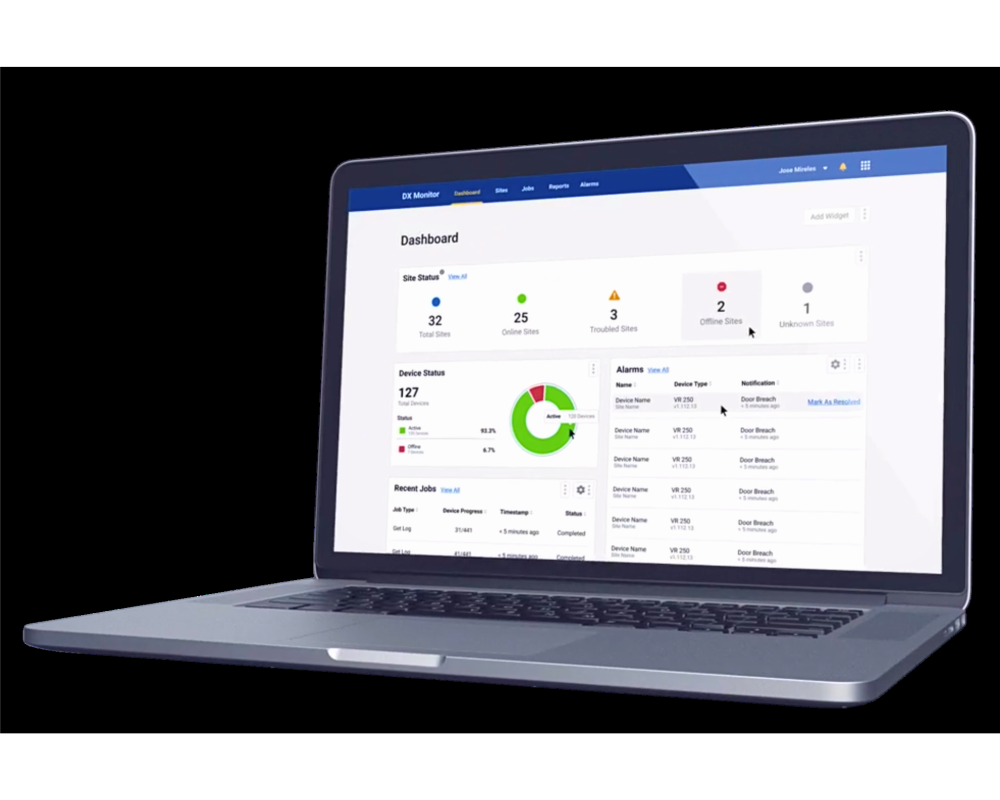
DX Monitor provides centralized monitoring and management of fuel dispensers and payment modules across forecourt networks. Operators can view dispenser health, monitor fueling point performance and flow rates across the enterprise, manage alarms, retrieve dispenser and payment logs, view dispenser screens remotely, schedule reboots, and distribute software and firmware updates from a single platform.
For retailers managing many sites, this creates a far more efficient way to stay ahead of issues. Instead of relying on site-level reports or waiting for a technician to diagnose a problem in person, teams see performance signals earlier, resolve more issues remotely, and make better decisions before sending resources to the field. Every truck roll avoided puts time and money back into the operation.
SiteIQ: Intelligence, Automation, and Workflow Action
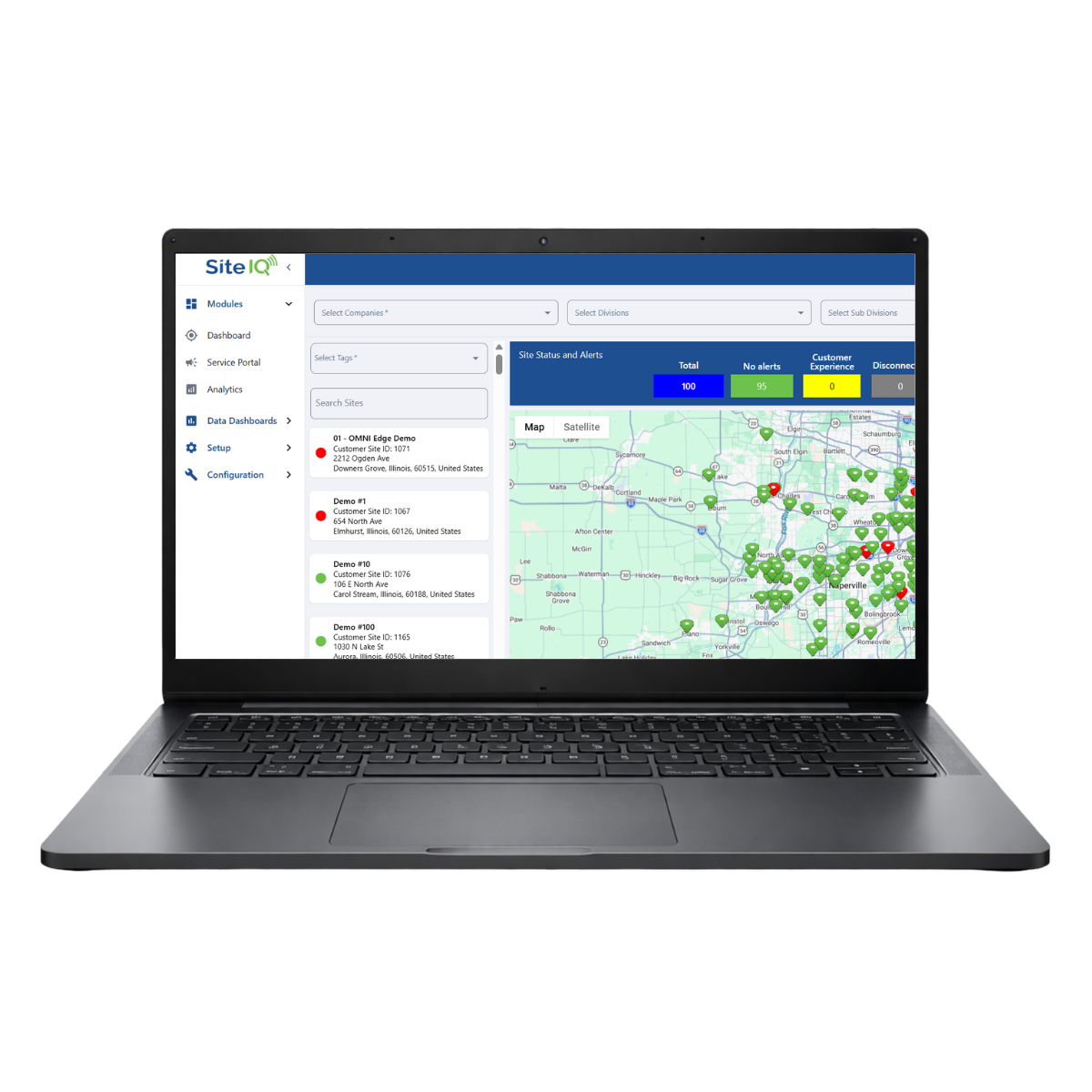
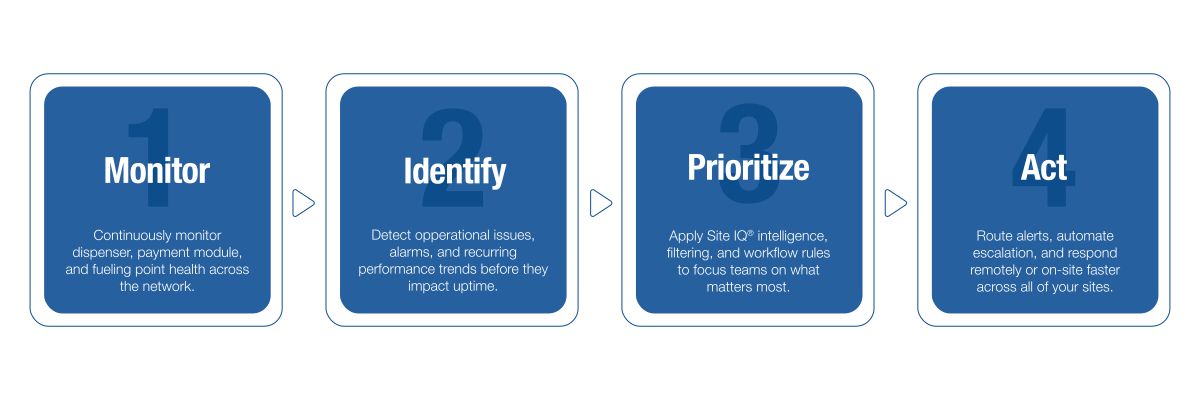
SiteIQ uses DX Monitor as a data source and adds the intelligence layer on top, aggregating data, filtering alerts, applying rules-based logic, and turning site information into actionable workflows. It helps teams understand which events need attention first, where recurring issues are appearing, and how to route data to the right people.
At the center of SiteIQ is a customizable rules engine. Where DX Monitor surfaces an alert, SiteIQ determines what happens next. Each customer defines the action, or the sequence of actions, they want to take and whether those actions run automatically or semi-automatically with approval. That can include:
- Automated dispenser reboots. Enabled at the customer’s discretion for a range of conditions, executed either fully automatically or with a quick approval step.
- Email reports with escalation. Rules-driven reports for conditions like printer paper out, low flow rates, or no transactions at a fueling point, with automatic escalation to a supervisor, and their supervisor, if action is not taken fast enough.
- Ticket dispatching. When a human needs to be involved, SiteIQ initiates and tracks the action through the existing ticketing system, like ServiceNow through API integrations. Automations are tracked too, so every resolution is documented.
Turn Forecourt Data Into Operational Action
Fuel retailers generate large volumes of data from dispensers, payment modules, and site systems, but the challenge is turning that data into fast, useful action. DX Monitor + SiteIQ gives operators real-time visibility into dispenser health, alarms, logs, and restart controls to help teams prioritize issues and respond faster.
Related Products
DX Monitor® FAQs
DX Monitor is part of the DFS DX® connected solutions platform and provides a flexible architecture that provides remote manageability and software updates across all your sites no matter how remote. DX Monitor provides enhanced troubleshooting capabilities, file distribution and retrieval from devices installed at sites, and reporting for customers in retail fuels on a world-wide basis.
- The Dashboard tab displays an overview of sites and devices.
- The Sites tab shows detailed information for sites and devices.
- The Jobs tab allows interacting with the site by uploading software updates or other files to devices, downloading logs or configuration files from devices, or scheduling restarts.
- The Reports tab allows viewing a variety of reports for the sites in your network.
- The Alarms tab provides a list of alarm events from the site devices.
- The Alarm Preferences tab allows configuring whether you will be alerted for specific alarm types by email or text message.
- The Devices tab shows a list of all devices linked to the site(s) to which you have access in DX Monitor.
- File Distribution: Update Dispenser Heartbeat Interval, Dispenser Software upgrade, DFS Anthem UX® Dispenser Software upgrade, Wayne iGem™ board upgrade.
- Get Logs: Retrieve log files from site devices.
- Get Configurations: Retrieve configuration files from site devices. The only available device type selections are Dispenser and EdgeDevice.
- Data Dump: Request a trace log download from an iGEM™ computer. The only available device type selection is Dispenser.
- Update Edge Variables: Set or create environment variables on a DFS Edge. The only available device type selection is Generic.
- Reboot: Schedule the restart of a site device.
- Door Breach Report: Provides a list of incidents where the door was opened without using the authorized security code.
- Dispenser Component Information Report: Provides a list of assets (dispensers, card readers, and so on) with serial numbers and firmware versions.
- Weekly Flow Rate Reports: Lists data about the average rate of fuel flow. This report is useful to determine whether the fuel filter needs to be replaced.
- Alert Report: Lists all alerts received from the attached systems.
- SPM Breach Report: Provides a list of incidents where a secure payment module (SPM) has been put into a potentially unsecured state.
- PCI Asset Management Information Report: Provides a list of assets (dispensers, card readers, and so on) with information for PCI compliance. (NOTE: All data for the following reports is from the dispenser’s iGEM™ computer, therefore, the CAN bus must be connected and correctly configured to retrieve this data. Also, these reports are not available to all organizations. Contact your regional account manager or sales representative for more information.)
- Fuel Sale Transaction Report: Provides a list of individual fuel sales transactions, and includes the flowrate, volume, unit price, and the sale amount for each transaction.
- Fuel Summary Report: Provides a summary of fuel sales, and includes the transaction count, total fuel volume, average unit price, and total sales per day for each grade.
- Bad card read, chip card read, contactless card read, magstripe card read
- Device decommissioned
- Door security disabled or breached
- Slow flow rate, flow rate below threshold, sudden flow rate drop
- Low disk space
- Printer paper jam, paper out
- Pump offline or idle
- SPM critically low battery, low battery, breach, connection state, in maintenance mode, low memory, reboot
We highly recommend that you navigate to our Training site and become familiar with the tutorial of DX Monitor - User Training. For a comprehensive user manual, please view our DX Monitor User Guide. For detailed instructions on DX Monitor’s primary functions please access DX Monitor Functions.
DFS Technical Support is available for all end users. For help, product suggestions, and end user support, contact the Customer Success team: CustomerSuccess@doverfs.com.
SiteIQ is a cloud-based platform that centralizes site data and alerts from fueling locations in one intuitive, easy-to-use system.
SiteIQ helps teams monitor and manage site operations more effectively by providing:
- Data aggregation from multiple site sources
- Advanced filtering and visibility into site activity
- A configurable rules engine
- Actionable alerts that help users identify and resolve issues faster
SiteIQ extends the capabilities of DX Monitor with enhanced tools designed to improve visibility, responsiveness, and operational efficiency, including:
- Customizable alert rules tailored to your operational requirements
- Workflow automation for common actions, such as:
- Dispatching service personnel
- Initiating dispenser reboots
- Sending reports and notifications to the appropriate stakeholders
SiteIQ works alongside DX Monitor and leverages the connectivity and site data enabled by the dispenser IoT infrastructure managed through DX Monitor.
At this time, SiteIQ and DX Monitor work together to deliver a complete solution.
DFS is actively working to unify DX Monitor and SiteIQ into a single platform. Over time, core features and services will be brought together into one streamlined experience.
For most day-to-day activities, users can work primarily within the SiteIQ portal, which offers expanded visibility and operational functionality.
Some DX Monitor-specific capabilities, such as software updates and device registration, are still in the process of being integrated into SiteIQ. During this transition, certain users, including senior technicians and administrators, may still need to access the DX Monitor portal to complete those tasks.
Need Help?


.png)

Copyright © 2026 Dover Fueling Solutions® | A Dover Company | Privacy Policy | Cookies | Terms of Use


Dover Fueling Solutions
Dover Fueling Solutions